Open the web app
No account needed. Pantry and shopping records stay in this browser.
Start using it FreshLife
Eat well, care for your body, and make room for people near and far. FreshLife begins with one meal and brings healthier living into every day.
Web app available now · Android and HarmonyOS on Huawei AppGallery only · iOS app not yet released
No account · records stay on this device · backup export available
Start where you are
There is no need to change everything at once. Start with one useful thing on the device you have.
No account needed. Pantry and shopping records stay in this browser.
Start using itInstall from Huawei AppGallery. The current native interface is in Chinese. Keep pantry, shopping and expiry reminders on your phone.
Open AppGalleryInstall on a compatible device. The current native interface is in Chinese. Check AppGallery for availability on your phone.
View HarmonyOS appThe iOS app is not yet published. Use the basic web tools in Safari on an iPhone or iPad.
Use the web app on iPhone Explore the iOS development previewWeb records do not sync automatically with native apps. Android and native HarmonyOS are listed only on Huawei AppGallery. FreshLife is not listed on OPPO, Samsung or HONOR stores. Check AppGallery on your device for the available release.
Try a useful tool
Enter the date printed on the package to help plan what to use first. This is a record reminder, not a food safety assessment. Check the packaging and storage conditions before eating.
From tools to everyday life
A healthier outlook, at your own pace. Care for yourself, make room for movement, support the people around you and waste a little less. FreshLife brings this outlook to everyday tools, with respect for your abilities, budget and circumstances.
Today, that outlook begins with food records, thoughtful shopping and sorting guidance. Follow one ingredient below to see what FreshLife can help with from purchase to sorting. Community posting, social features and health-management services are not available.
Explore our approach to everyday living and community →Food, use and sorting
Check your pantry. Use what you need. Sort the packaging when it is empty.
Bring home
Keep food, quantities and dates together. Before buying more, take a look at what is already at home.
Use thoughtfully
Record the amount you actually use. What is left stays clear, so the next meal can start with what you have.
Sort after use
Only record empty packaging when it is actually empty. Check the material guide, then follow local collection rules.
Explore sorting guidanceWaste less
The box illustrates temporary sorting at home, not an official collection bin. Check which materials your local collection point accepts, then prepare and take them there as instructed. Check caps and labels separately; keep broken glass out of ordinary cardboard boxes.
Our circularity planSorting guidance is available. Physical collection, appointments and redeemable rewards are not yet offered.
Product
Choose a device and try one small interaction. Available features and release status are clearly marked.
iOS · Preparing for App Store release
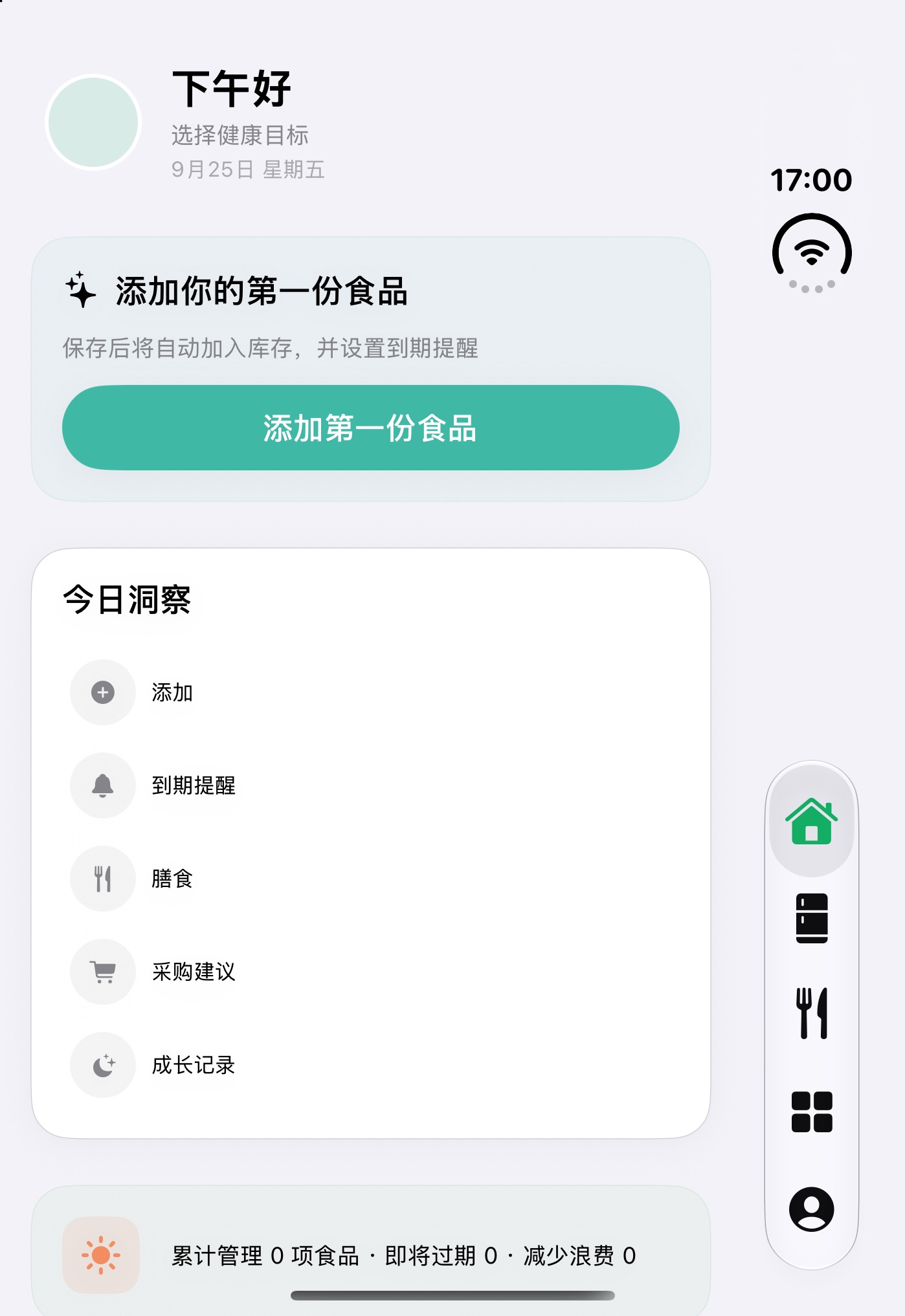
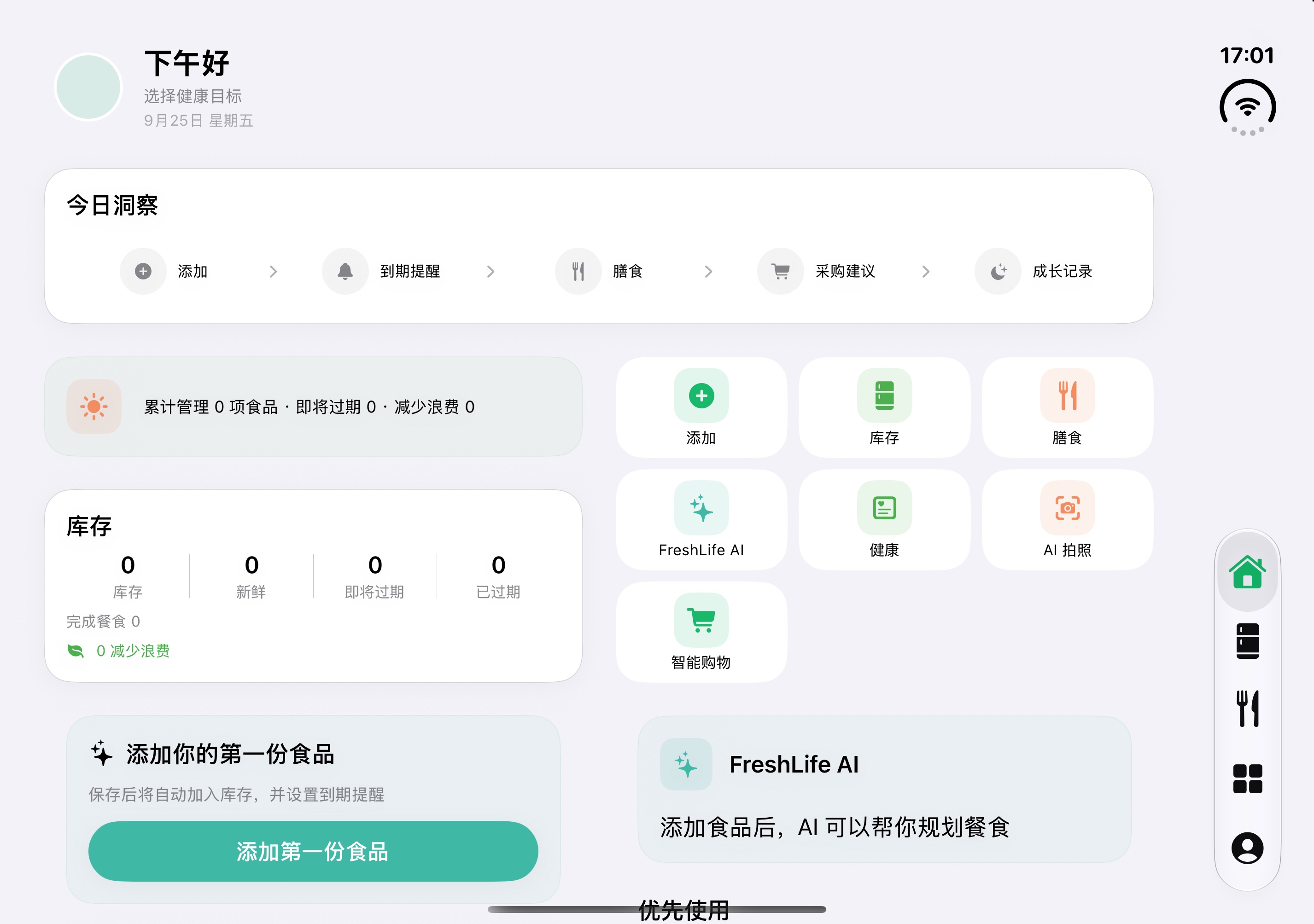
The iPhone and iPad previews use sample data. An unfolded layout remains under exploration; the iOS app is not yet on the App Store.
iOS · Development preview
The iPhone home screen brings pantry status and common actions together. The Duo outer and unfolded views explore how the same interface adapts to different screen sizes.
The iOS app is not yet on the App Store. Duo images are layout concepts; they do not indicate completed foldable-device compatibility or testing. Try the interactive example below.
Try the web app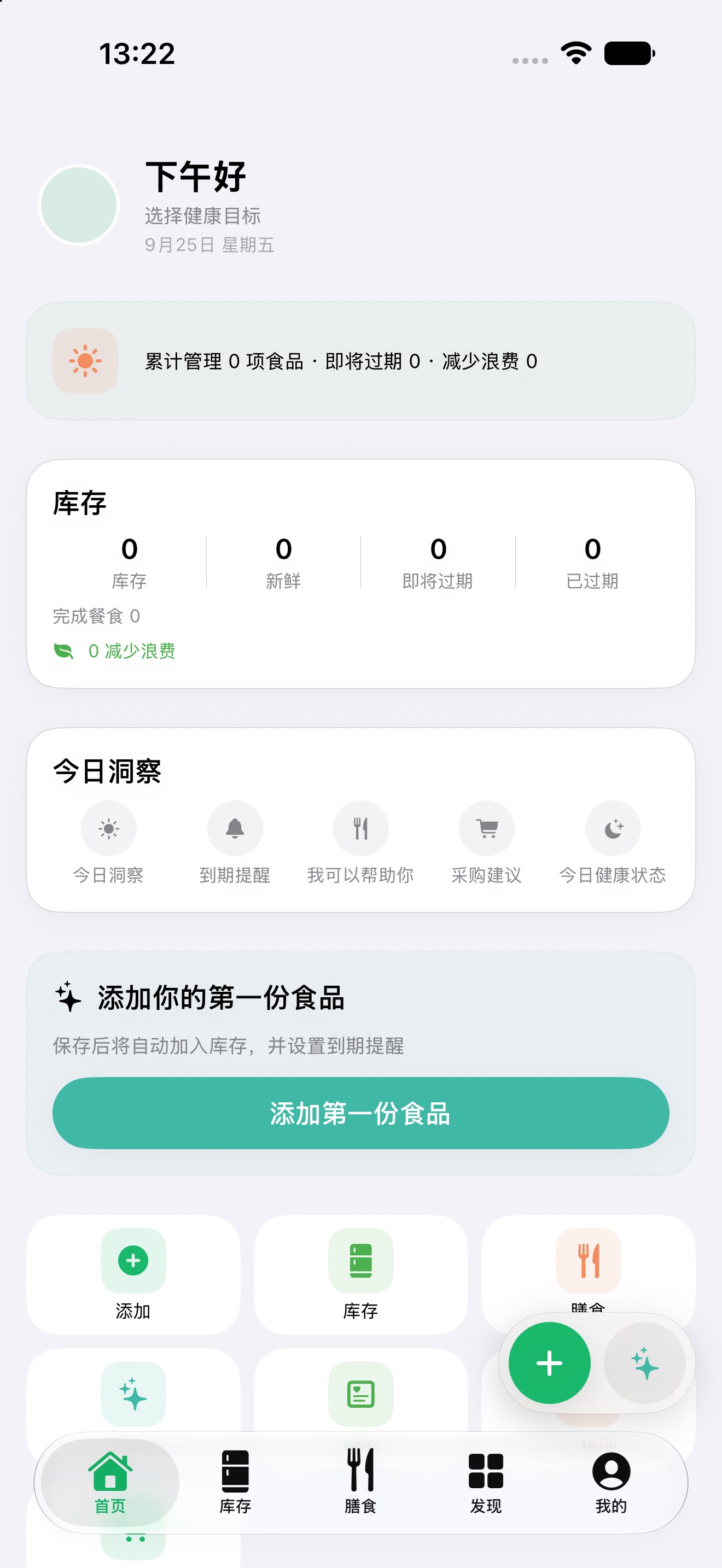
FreshLife AIFresh milk and cherry tomatoes tonight? Try creamy tomato rice.
Use the fresh milk first2 days left — great for a rice dish or oatmeal.
FreshLife AIFresh milk and cherry tomatoes tonight — one creamy tomato rice.
Use the fresh milk first2 days left — great for a rice dish or oatmeal.
Tap the buttons below to switch the iPhone demo, or use the iPad sidebar. All five screens share the same pantry data, so each step stays connected.
Try this interactive example to explore the workflow. It is not the actual app screen, and your actions will not change real inventory. Reload the page to start again.
Record what you bought, with quantity and storage details.
See which food needs attention before planning your next meal.
Confirm the amount used so the remaining quantity stays clear.
Receive your purchase and keep each batch separate.
Enable JavaScript to try the sample, or read the feature descriptions on this page.
Android · Available on Huawei AppGallery
Android 1.0.15 is now published on Huawei AppGallery. Open the official listing to download it. Read update notes. Check AppGallery for available downloads.
Track food, record consumption and waste, and move purchased items into your pantry. No account is needed for this offline release.
Check Huawei AppGallery for the version available in mainland China. The current native interface is in Chinese.
Download for Android Android guideRecord the item, quantity, storage location and expiry date so your pantry matches what you have.
Review what is nearing expiry. Confirm consumption or waste when it happens to keep records useful.
Keep what you need in a shopping list and add purchases to your pantry. Export a backup before changing phones.
Household settings are stored on this device. They do not create a shared account or synchronize records between family members’ phones.
Estimates depend on the records you confirm. With too little history, keep recording instead of treating an estimate as a purchase instruction.
This offline release does not offer cloud recovery. Export a backup while your old device is available, then use the restore option. Local reminders also need notification permission.
Try this interactive example to explore the workflow. It is not the actual app screen, and your actions will not change real inventory. Reload the page to start again.
Record what you bought, with quantity and storage details.
See which food needs attention before planning your next meal.
Confirm the amount used so the remaining quantity stays clear.
Receive your purchase and keep each batch separate.
Enable JavaScript to try the sample, or read the feature descriptions on this page.
Native HarmonyOS · Available on Huawei AppGallery
HarmonyOS 1.0.13 is published on Huawei AppGallery. Check the listing for device compatibility. Read update notes.
The native release is available. Check AppGallery for its current version. Manage local pantry items and shopping records without an account or cloud sync.
Check Huawei AppGallery on your phone to see whether you can install it. We have not yet tested on physical HarmonyOS devices, so some devices may not be compatible.
Check Huawei AppGallery for the version available in mainland China. The current native interface is in Chinese.
Download for HarmonyOS Installation helpAndroid and native HarmonyOS are separate releases, available in mainland China. Check the developer information on the official store listing. Use “Download for HarmonyOS” to open the official listing. Continue installation on a compatible device, or try the web app.
Open web appFeatures vary by device, but your records and choices stay in your hands.
Check your pantry before shopping.
Changes to stock remain your decision.
Local storage, with export and deletion controls.
No live collection service, redeemable rewards or cloud sync.
Everyday · FreshLife
Start where you are. These choices lead to tools you can try now, or to clearly marked plans for the future.
See what is already at home. Record what you need before making another purchase.
Available · local browser storageOpen the pantry web appA walk, a quiet break or time for a meal: explore sourced, general care information and keep a private note if you wish.
Available now · no diagnosis or activity trackingExplore everyday care and its sources Explore everyday food choicesCheck what each material is and what local facilities accept. A personal record does not confirm recycling.
Guidance available · collection not offeredExplore everyday waste sortingWhy FreshLife
From bringing food home to using it and sorting what remains, there is a simple path through the everyday. Take any step at your own pace.
Check the pantry, then make your list. Fewer duplicates mean less to sort out later.
Open pantry and listUsed only part of an item? Record that amount and keep the rest in your pantry.
How quantity records workIdentify the material and check local collection rules. A log is not proof that something was recycled.
Explore sorting guidanceUse the web app without an account. Records stay in this browser and do not sync automatically with the mobile apps. How data is stored
Wellbeing activities, redeemable points and physical collection are still being planned. See what comes next
From Fridge to Table · iOS preview
Follow one ingredient from the moment it comes home to the meal it becomes: log it, get a timely reminder, plan a dish, then add what is missing to your list.
Anything you bring home — snap it, scan it, or type it in. Where it lives and how long it keeps: FreshLife remembers for you.
On screen: fresh milk just logged, 7 days left.
Items nearing their date surface on Home and in your notifications. No more daily fridge checks — you can see at a glance what to eat first.
On screen: fresh milk has 2 days left, top of “Expiring soon”.
Open Meals and FreshLife suggests dishes from what is already in your pantry. Items about to expire come first, and anything missing is called out. Pick one you like and follow along.
On screen: creamy tomato rice — ingredients ready, about 18 minutes.
Anything a recipe is missing goes straight to your shopping list. Shop from the list, then log what you brought home to keep your pantry up to date.
On screen: scallions, cheese, mushrooms — 3 items to buy.
Add Food
The recognition demo describes the unreleased iOS app. Android, HarmonyOS and the web app currently use manual entry; they do not offer these recognition features.
Snap, scan, pick from your library or type — use whichever feels natural. Recognition runs on your device, no API key needed; check anything you’re unsure about before saving.
Take a picture of the food and on-device Apple Vision tries to read its name, category and date.
Snap → Recognize → Check → Add
No API key, no network; you can edit anything before saving
Scan a FreshLife food QR code to bring the item in quickly.
Scan → Read → Confirm → Add
This version supports FreshLife QR codes only; retail barcode lookup isn’t available yet
Choose a photo you’ve already taken, recognize it, and add it to your pantry.
Choose → Recognize → Check → Add
Recognition happens on your device — photos never leave your phone
Enter name, category, quantity, storage spot and expiry date yourself — most reliable, most flexible.
Fill in → Save → Done
Great for unusual packaging or when you want exact records
Recognition results and nutrition info are reference only: check packaging labels, storage conditions and official recall notices. Normal appearance or smell does not guarantee food safety. Retail barcode lookup isn’t available in this version.
FreshLife AI · iOS preview
Android, HarmonyOS and the web app do not currently offer these meal suggestions.
FreshLife AI starts with what is in your pantry, what needs using soon, and your preferences. On-device features work offline; remote AI is not enabled in the current version — if it ships, it will be off by default and switched on only by you.
Camera and photo-library recognition use Apple Vision on your device; meal suggestions are computed locally from what is already in your pantry and work offline.
Not enabled in the current version. If it ships later, it will be off by default, switched on by you, and will send only the minimum needed for your request.
AI recognizes and suggests — it never changes your pantry on its own. Recognition results, meal plans and shopping changes all need your confirmation first.
The iOS preview has no remote AI enabled. If it ships later, it will be off by default; before you enable it, the app will explain what information is processed and ask for your clear consent, and only the minimum needed for that request will be sent. Allergy information, health goals, profile details, AI memory, meal and shopping history, and long-term behavior records are not part of any planned remote AI requests. No service-provider API keys are built into the app, and the app will never ask you for one. AI suggestions are reference only — not medical advice.
Privacy
Core features run on your device, no account needed. Remote AI isn’t enabled in the current version; if it ever ships, it stays off by default, and important data changes always need your confirmation.
Your pantry, preferences and other core data live on your own device.
There is no account system; your profile stays on your device.
No ad SDKs, no third-party analytics, no cross-app tracking.
Export, reset AI memory or delete all local data whenever you like.
Want the details? Privacy Policy · Terms of Use · Safety & Transparency — all written to be read, not skipped.
At a Glance
The homepage keeps only the four areas you will use most. How each feature works, its limits and its current availability are explained item by item on the full feature page.
Vision
Every person and household has a different rhythm. Today we focus on food records and thoughtful shopping. In the future, we hope to support shared experiences, encouragement and everyday care. Community features are not available; participation and sharing will remain your choice. Explore the community and ESG plan →
The released Android and HarmonyOS apps focus on local pantry, shopping and usage records. Explore meal suggestions in the iOS preview; see each platform’s guide for its available features.
Improve usage estimates and preferences based on existing local household settings and confirmed records. Shared accounts, cross-device sync and cloud household collaboration are not available.
A future space to share practical experiences, respect different ways of living and encourage one another. Posting and social features are not available.
Roadmap
These areas continue to evolve: easier logging, household context, and weekly planning. The published Android app includes local household settings and usage estimates; full cloud collaboration is not available yet.
Make recording food faster and easier: less typing, fewer checks, fewer mistakes.
Learn your household’s preferences on-device: tastes, dietary restrictions and regular purchases, so suggestions fit better over time.
Move from planning tonight’s meal to seeing how the whole week fits together, with smarter meal plans and restock suggestions based on real use.
Why this order? Read the full philosophy and long-term direction
Waste reduction & circularity · Planned
Prevent food waste first, then explore a small pilot for separated tea leaves and coffee grounds. Packaging receives local guidance; mixed food waste and hazardous items are outside the proposed pilot.
Explore only separately collected materials explicitly accepted by a recipient. “Organic” or “eco-friendly packaging” is not automatic eligibility.
Connect designated drop-off, inspection and processing evidence. Keep self-reports separate from recipient confirmation and show unknown destinations honestly.
Future funded campaigns could offer limited benefits after verification, with participation and budget caps rather than incentives to create more waste.
Web sorting guidance is available. Android and native HarmonyOS can be found on Huawei AppGallery. Check each listing for its current version. iOS is not yet released. Collection, bookings and redeemable rewards are unavailable. Do not send materials to FreshLife.
FreshLife Membership · Planned
We plan to offer a free membership card in FreshLife, with support for Apple Wallet. A future FreshLife store and participating local shops would recognize the same membership.
Cards, rewards, the online store and in-store transactions are not available yet. No stored-value balance is offered. Final benefits and participating shops will be announced before launch.
FreshLifeMember cardChoose with care. Enjoy the everyday.
Design concept · Not a payment card
The card would identify membership and eligible benefits. Payment is separate. Adding a card to Apple Wallet is not available yet.
FAQ
No. The released Android, HarmonyOS and web apps let you record pantry items and shopping lists without an account. Features differ by platform; registration and cloud sync are not available.
Local pantry and shopping features work offline on Android and HarmonyOS. The web app needs a connection on first use and must finish caching before it can open offline; it has no background notifications. See the iOS preview for local meal features. Remote AI is not available.
Photo recognition is part of the unreleased iOS version and runs locally with Apple Vision. Check names, quantities and dates before saving, and edit when needed. Android, HarmonyOS and the web app currently use manual entry, without this recognition feature or retail barcode lookup.
No. AI only recognizes and suggests; it never changes your pantry directly. Recognition results, meal plans and shopping changes all take effect only after you confirm them.
No. Dates and nutrition come from your entry, packaging or recognition — they’re management references. Check packaging labels, storage conditions and official recall notices. Normal appearance or smell does not guarantee food safety.
Local preferences are different from cross-device household memory. Android 1.0.2 includes local household settings and usage estimates based on confirmed records; iOS capabilities depend on its version. Full cloud household memory is not available, and the app does not place orders automatically. Any future online service will explain its data use and request the necessary consent before launch.
Choose your platform in the Help Center for the correct export and deletion steps. Android and HarmonyOS use local backups, and web exports are saved where you choose. Backup files are not guaranteed to work across platforms. Export before clearing data or changing devices, and manage exported files separately.
Website and release progress · October 7, 2026
Check Huawei AppGallery for current Android and native HarmonyOS versions and device compatibility.
Android 1.0.15 and native HarmonyOS 1.0.13 are now available on Huawei AppGallery. The meal and settings improvements below are included in these releases. Read the everyday workflow →
Release status: Android 1.0.15 and native HarmonyOS 1.0.13 are now published on Huawei AppGallery. Download Android from its official listing. The screenshots show the corresponding app interface. Check AppGallery for device compatibility and availability in your region.
Web beta 1.4.1 · Available
Common food shortcuts still ask you to confirm the amount and date. After finishing an item, search the actual scraps or packaging; local disposal guidance remains separate from FreshLife collection, which is not open.
If you still see an older version, save any open form and follow the update notice at the top of the web app. You can also close all old tabs and reopen it.
Open web app →Android 1.0.15 · Available
This release includes six offline recipes, stock-based additions and meal display settings. This release fixes text loading on older Android versions, prevents a crash when source links cannot open and avoids loading illustrations when they are switched off. Planning and browsing steps do not consume stock; you confirm actual amounts after cooking.
Read update notes →HarmonyOS 1.0.13 · Available
This release supports recipe ordering and visibility, with image and tip switches. This release fixes rollback after settings fail to save, prevents overlapping writes and adds feedback when meal actions fail to save. Whole items still require whole-number amounts; stock is unchanged until confirmation.
Read update notes →iOS changes remain in validation, without an App Store release. No collection service, redeemable rewards or cross-platform sync is available. Download options · Full update notes
Web beta · English & Chinese · Saved in this browser, without App sync. iPhone installation guide
Android and HarmonyOS are available on Huawei AppGallery. iOS is preparing for release.
Android and native HarmonyOS are available in mainland China. Changes marked as not yet released are not included in the installed version.
On Huawei AppGallery
Check the listing for the current version
Download for AndroidOn Huawei AppGallery
Check availability on your device
Download for HarmonyOSPreparing for release
No App Store download yet. iPhone users can try the web beta.
Use the web app on iPhoneExplore the iOS development preview →iPhone web app guide →Beta · Try now
English & Chinese · records stay in this browser.
Open web appAdd to Home Screen guide →Check the official AppGallery listings for current versions and device compatibility.